
Bank Reconciliation · True or False
Is Bank Reconciliation Optional? True or False, Explained
Is bank reconciliation optional? No. Reconciling the bank statement is optional — true or false? False, and this trick question shows up constantly in accounting courses. Reconciliation feels like busywork. Then one day it saves you — from an overdraft fee, a missed fraud charge, or books that won’t close. In everyday bookkeeping, you match your ledger against your bank statement. It’s a required control, not a nice-to-have.
Here for a quiz? Mark it false and move on. Run a business? Keep reading — the reason matters more than the answer.
Is Bank Reconciliation Optional? No — Here’s Why
Bank reconciliation catches the gap between your ledger and your bank. That gap never stays at zero for long. Bank fees post without warning. Cheques sit outstanding for weeks. A client’s wire lands a day late. Someone mistypes an amount during entry. None of this surfaces until you compare your ledger to the statement, line by line.
Skip that step and problems build quietly. Small discrepancies pile up first. Your reported cash balance drifts from your real balance next. By month three or four, you’re untangling a much bigger mess than if you’d reconciled monthly. Auditors expect reconciled statements. So do lenders and tax authorities. Bookkeepers spot an unreconciled ledger fast — it’s often the first red flag in a review.
What Actually Happens If You Skip It
- Fraud goes unnoticedReconciliation usually catches duplicate payments, unauthorized withdrawals, and skimmed deposits. Skip it and fraud slips through.
- Cash flow decisions get made on bad dataYour books might show more cash than you actually have. Every forecast built on that number is wrong too.
- Tax filing gets harder and riskierUnreconciled accounts leave unexplained gaps at year-end. You either pay for extra accountant hours or accept a rough estimate.
- Bank errors slip throughBanks make mistakes too. Reconciliation is the only place those surface.
How Often Should You Reconcile?
Reconcile monthly at minimum, tied to your statement cycle. Higher-volume accounts need more frequency. Agencies running client trust accounts reconcile weekly. So do e-commerce sellers with daily payouts and bookkeepers juggling several clients. The longer a discrepancy sits, the harder it is to trace. Reconcile often enough that you still remember what happened that week.
The Part Nobody Tells You: Reconciliation Doesn’t Have to Take Hours
People don’t skip reconciliation because they don’t understand it. They skip it because doing it by hand is tedious. You scroll between two spreadsheet tabs. You check off matching rows one by one. The task keeps slipping to “next week.” That’s the real problem worth solving. It’s why we built ReconcilePro — a free browser-based bank reconciliation tool on SaasLancer.
Upload your ledger and your bank statement. ReconcilePro reads PDF, CSV, or Excel and auto-parses either format. Set an amount tolerance and run Auto-Reconcile. It matches transactions automatically, including one-to-many matches, where a single bank deposit covers several ledger entries. Everything sorts into Matched and Unmatched buckets, so you know exactly what still needs a human eye.
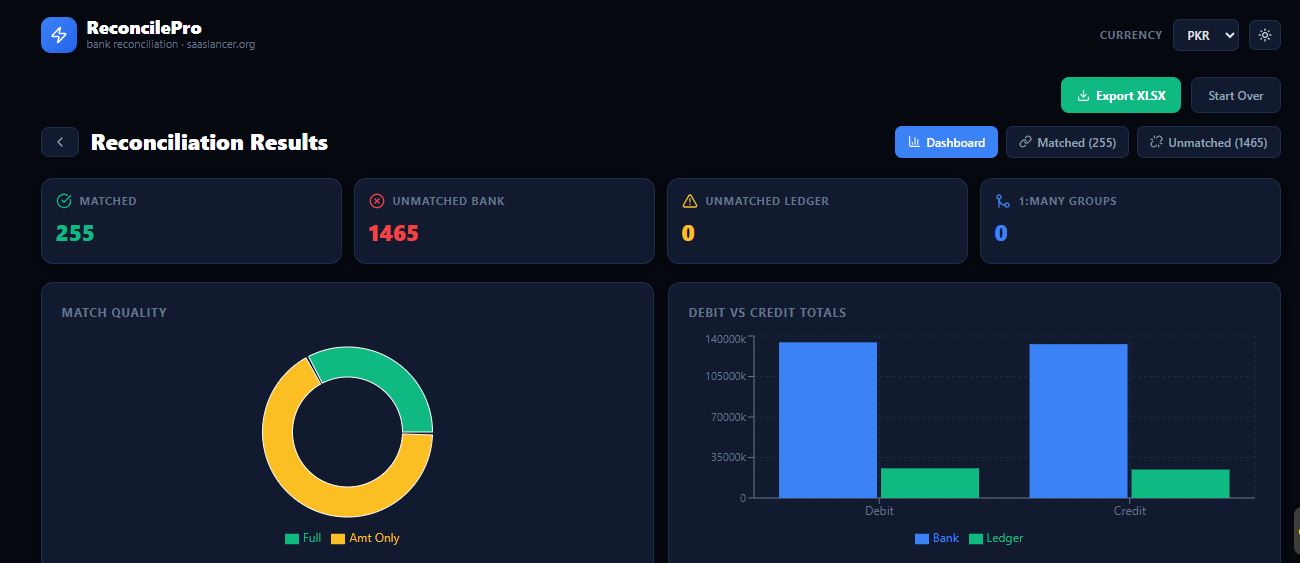
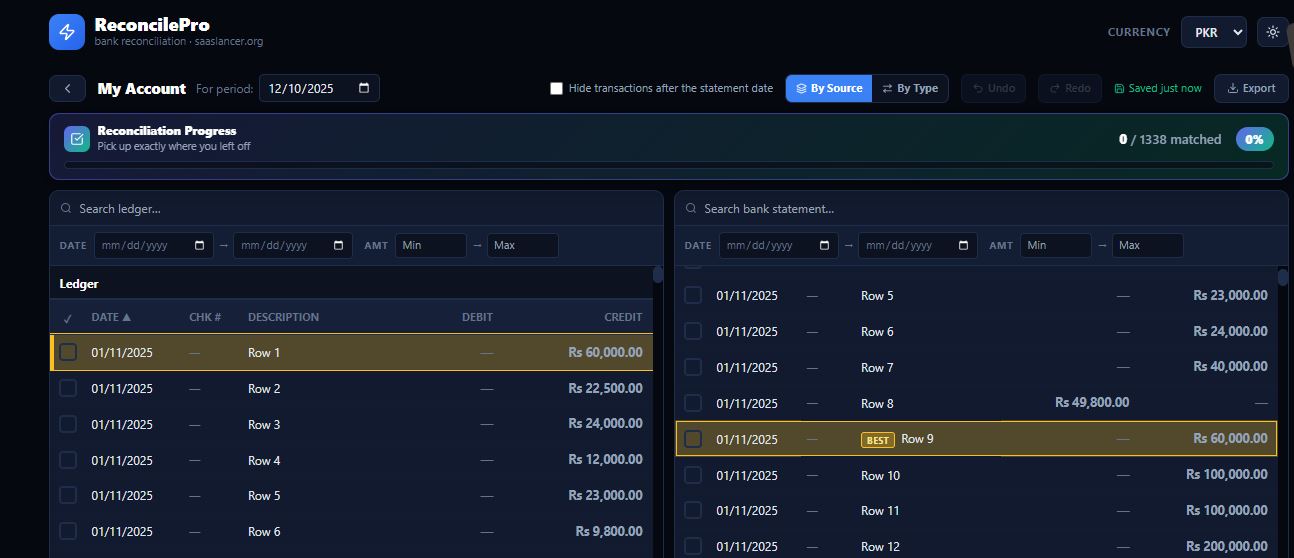
Manual Reconcile handles the rows that don’t auto-match — timing differences, partial payments, an outstanding cheque. It gives you a QuickBooks-style click-to-clear view. It also highlights the best matching option for any selected ledger line, based on amount and date. You won’t hunt through hundreds of rows to find the one that fits.
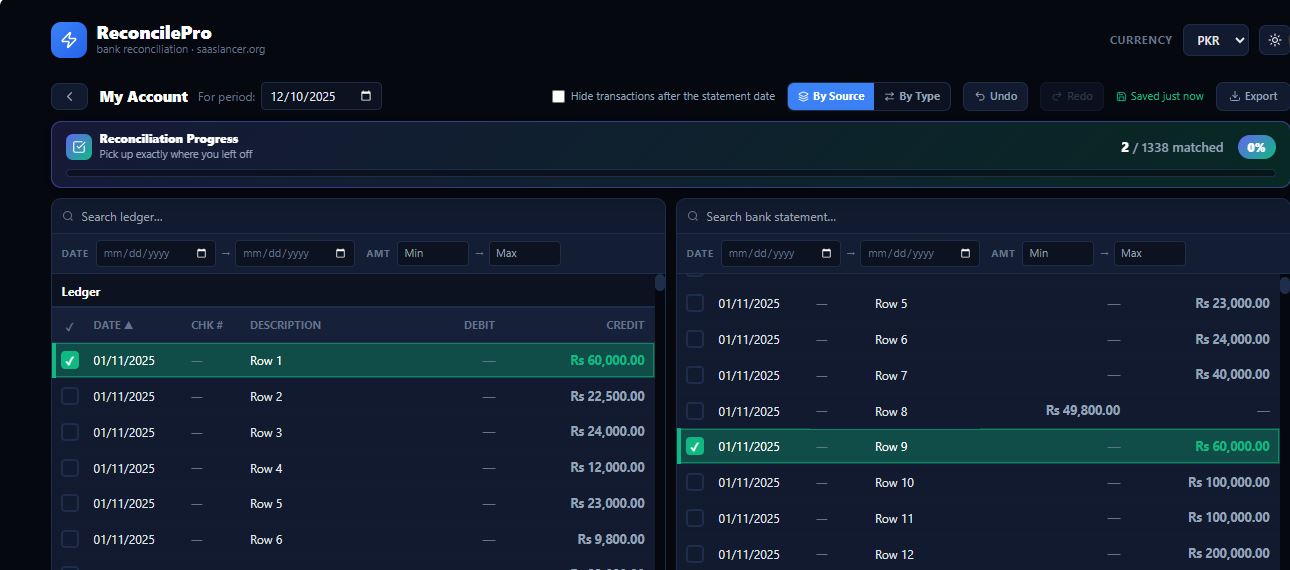
Confirm a match and the row turns green. A progress bar tracks how far you’ve gotten. That matters when you’re reconciling a thousand-plus row statement in one sitting.
There’s no signup and no credit card. Nothing leaves your browser. Freelancers, bookkeepers, and small accounting teams use it for real reconciliation control without the overhead of enterprise software. Try it directly at saaslancer.org/tools/reconcile-pro.
Frequently Asked Questions
Is bank reconciliation optional? True or false?
False. People phrase this two ways — “is bank reconciliation optional” or “reconciling the bank statement is optional, true or false.” Same question. Same answer. Accurate books require it, whether you follow formal accounting standards or just want to know your real cash position.
What is the main purpose of bank reconciliation?
It confirms your ledger’s cash balance matches your bank’s actual balance. It also flags every difference between the two — bank fees, outstanding cheques, timing gaps, or errors on either side.
How long does bank reconciliation usually take?
By hand in a spreadsheet, expect 30 minutes to several hours, depending on transaction volume. With an auto-matching tool like ReconcilePro, most accounts reconcile in a few minutes. You only review the genuine exceptions.
Can I reconcile a bank statement without accounting software?
Yes. A free browser-based tool works well if you don’t need a full accounting suite. You just need your ledger and your bank statement, in PDF, CSV, or Excel format.
For a broader reference on reconciliation as an accounting concept, see the Investopedia overview of account reconciliation.